Limited time: Get 75% off hardware* when you switch to our recommended POS  provider.

Speak with an expert
Build & Price
Banner Image

Point of sale hardware built for specialty retailers

POS Nation helps grocery, liquor, tobacco, and convenience store owners find POS hardware that actually fits their needs — no generic setups, no one-size-fits-all solutions, no stress.
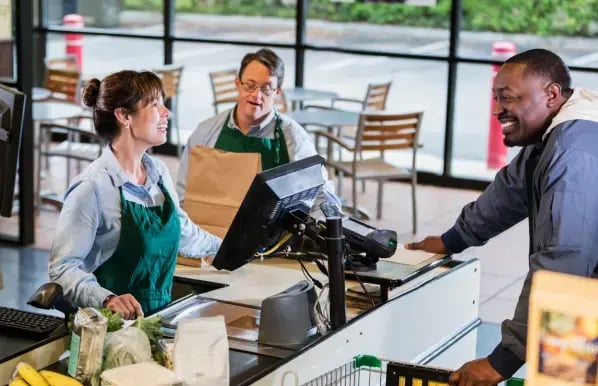
Take the guesswork out of choosing POS hardware

Feeling overwhelmed by the amount of point of sale hardware on the market? We’re here to help.

At POS Nation, we help you:

Find the perfect POS hardware setup for the way your store actually runs.
Set up your POS hardware — including connecting barcode scanners, printers, deli scales, and more.
Keep your POS hardware running for the long term with ongoing support.

Essential point of sale hardware components

Let’s start with the basics. Here are the core POS hardware components all retailers need.
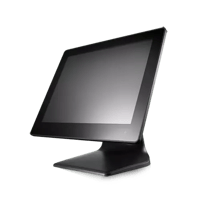
Touch-PC-POS-Nation-Widescreen-1

All-in-one computer

This touchscreen monitor is the gateway to your POS software. Customize the layout, process transactions, check inventory, and more.
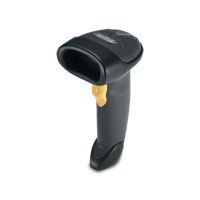
POS-Nation-Scanner-1

Barcode scanner

Barcode scanners eliminate manual item entry and speed up checkout. Choose from 1D, 2D, or age verification barcode scanners.
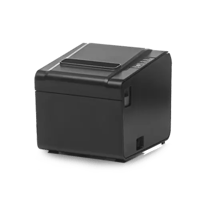
Thermal-Printer-POS-Nation

Receipt printer

Receipt printers should be fast and quiet. Inkless thermal printers are your best option, requiring no ribbon refills and minimal maintenance. 
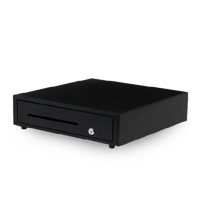
Cash-Drawer-POS-Nation

Cash drawer

A cash drawer keeps money secure and organized. Choose one that pops open automatically for cash transactions.

Pin-Pad-VX805

PIN pad

Your payment device should let you accept all payment types — including credit, debit, contactless pay, swipe, and even EBT.
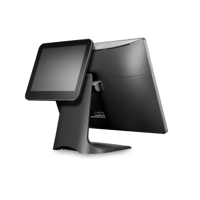
Integrated-LCD-Rear-Display-1

Customer-facing display

These customer-facing screens show customers exactly what they’re buying and the price, helping you build trust.

POS hardware for liquor and tobacco stores

Generic retail POS solutions aren’t always enough for liquor and tobacco stores. When it comes to managing cigar inventory or preventing underage alcohol sales, some providers expect you to figure it out on your own or work with a third party.

But not POS Nation. We make sure liquor and tobacco retailers have all the tools they need, including:

id-scanner-for-liquor-stores

Age verification scanners

Age verification scanners ensure customers are of legal drinking age within seconds, helping you keep checkout lines short and protect your liquor or tobacco license.

are-smoke-shops-profitable

Cigar label printers

Individual cigars don’t come labeled, so you need POS software to generate barcode labels and POS hardware to print them.

POS hardware for grocery stores and markets

Your grocery store needs POS hardware that can handle high inventory turnover, weight-based sales, and busy rush hours. Generic POS solutions don’t fit the bill.

That’s why we’ve curated the best hardware solutions for grocery stores and markets, including:
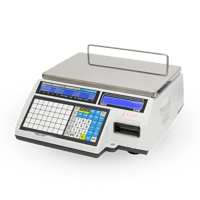
CAS-Deli-Scale

Integrated scales

Deli, scanner, and tabletop scales help you sell meat, cheese, and produce faster and with fewer errors. Enjoy full POS integration and commercial-grade reliability.
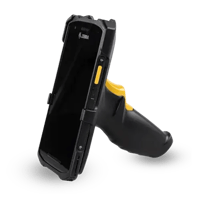
Inventory-Handheld

Mobile inventory device

Perform lightning-fast stock counts, receive new inventory, and adjust prices all from the sales floor using a mobile inventory device.
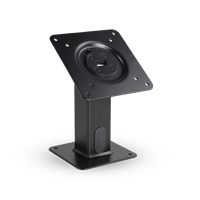
S-Stands

Flexible mounts

Different mounts allow you to switch your cashier-led lane to a self-checkout station in seconds. Choose from pole, VESA, or custom mounting solutions.

FAQs: Point of sale hardware

Expand allCollapse all
What POS hardware do I need for my new retail store?

At minimum, you need a touchscreen terminal, barcode scanner, receipt printer, cash drawer, and a PIN pad for card payments. Depending on your industry, you may also need specialty hardware like an age verification scanner, deli scale, or label printer.

Can I keep my existing hardware when I switch to a new POS system?
The best answer is that it depends. Many POS software solutions can run on any hardware, but other POS providers require you to purchase or lease proprietary devices. POS Nation’s recommended solutions can work with a variety of hardware components. Talk with one of our experts to learn more.
How much does retail POS hardware cost?
It depends on your store’s needs and your POS provider’s requirements. If you’re starting a brand-new store, expect to spend $1,000 upfront for the basics, including a touchscreen PC, barcode scanner, receipt printer, and PIN pad. If you’re a specialty retailer, you may need additional tools like a deli scale or ID scanner.
Is setting up new POS hardware difficult?

Setting up your new POS hardware should be easy — especially with the right support. Your provider should walk you through the setup process, from turning on the hardware to integrating tools like deli scales and scanners. They should also help you troubleshoot issues during onboarding and beyond.

Should I invest in retail POS hardware or an iPad-based system?
iPad-based systems are popular among boutique and cafe owners since they’re affordable and easy to use, but they don’t always hold up well in busy retail environments like grocery and liquor stores. We recommend investing in commercial-grade hardware for your checkout lanes and using iPads or other mobile devices to access your sales and inventory reports through the cloud.

Build your custom POS hardware setup

Ready to upgrade your store’s checkout counters? We’re here to help you make the best investment for your business. Get expert advice, ongoing support, and reliable hardware.